
Chapter 06 of 12
API Testing Environments, Auth and Secrets
Run one suite against development, staging and production without editing it, guard the environments nobody may write to, and keep credentials out of tests.
A suite that only runs against one environment is a suite that will not be trusted for a release. The mechanics of wiring up API testing environments are simple, and the discipline that makes them safe is where teams get hurt.
Nothing environment-specific belongs in a test
The rule is short. If a value differs between development and production, it does not belong in the test.
That covers more than the base URL. Account identifiers, tenant names, API versions in the path, feature flags, callback URLs and every credential fall on the same side of the line. A test that hard-codes any of them works in exactly one place, and the copy somebody makes for the next environment becomes a second test to maintain.
# Tied to one environment
GET https://api-staging.example.com/v2/tenants/acme-staging/orders

# Runs anywhere
GET {{baseUrl}}/v2/tenants/{{tenantSlug}}/orders
The second form has a second benefit that shows up later. When something breaks only on staging, you know it is the environment and not the test, because the test is identical in both places.
An environment matrix that people actually use
| Environment | What runs there | Writes allowed | Data |
|---|---|---|---|
| Local or development | Fast functional cases while writing code | Yes | Whatever the developer creates |
| Preview per branch | Functional and contract tests in the pull-request gate | Yes | Created and cleaned by the run |
| Staging | The full suite, load tests, the complete security profile | Yes | Seeded, reset regularly |
| Production | Read-only synthetic checks and contract validation | No | Real customer data |
The one row people argue about is production, and the argument is usually about whether a smoke test may create a test order. It may not, because that order becomes a line in the finance export that somebody has to explain and reverse.
Protect production with a guard, not a convention
"Do not point the write suite at production" is a convention, and conventions fail on a Friday afternoon when somebody picks the wrong entry in a dropdown.
A guard is better. Mark the environment read-only, and let the runner refuse anything that is not a GET, a HEAD or an OPTIONS before the request is built. The refusal should be visible in the results as its own state and not as a failure, because nothing was sent and nothing was proven either way.
One consequence matters before you switch such a guard on. APIs that read via POST, which covers search endpoints, GraphQL and report queries, cannot be exercised against a read-only environment either. The guard goes by the method and not by what the endpoint does with it, and that is the correct trade for a protection that has to be reliable.
Authentication belongs to the environment
Credentials differ per environment, and the tests should not know that. Configure authentication once per environment, and let the suites inherit it.
Three levels cover essentially every real setup.
| Level | Use it for |
|---|---|
| Environment | The default credential every suite uses in this stage |
| Suite | A suite that genuinely needs a different identity, such as an admin-only area |
| Case | The exception, usually a negative test that sends the wrong credential on purpose |
The negative cases are the reason the third level exists. A test that proves an endpoint returns 401 without a credential needs a way to send no credential, and a test that proves 403 needs a valid credential belonging to somebody without permission.
For the methods themselves, which cover keys, bearer tokens, OAuth grants and the signature-based schemes, see the API authentication guide.
Secrets are references, not values
A credential typed into a test is a credential that will eventually leave the building. It goes into an export, a copy between environments, a shared report or a screenshot in a support ticket.
The alternative costs nothing. Store the credential as a secret variable on the environment, and reference it by name from the authentication configuration. The test then holds a reference, and the reference is safe to copy, share and read out loud.
This has a practical side effect that people notice before they notice the security benefit. An authentication setup built from references is portable, so copying it to another environment works, because each environment resolves its own value. An authentication setup with a literal secret in it cannot be copied without either leaking the secret or arriving incomplete.
Three habits round it out.
Rotate on a schedule, not after an incident. A credential that has never been rotated is a credential nobody knows how to rotate.
Give the test account the least privilege it needs. A suite that only reads should authenticate as an identity that can only read. A mistake in the suite then produces a 403 instead of deleted data.
Mask secrets in output. A run report that prints the resolved request is enormously useful right up until it prints a token.
In Routebase
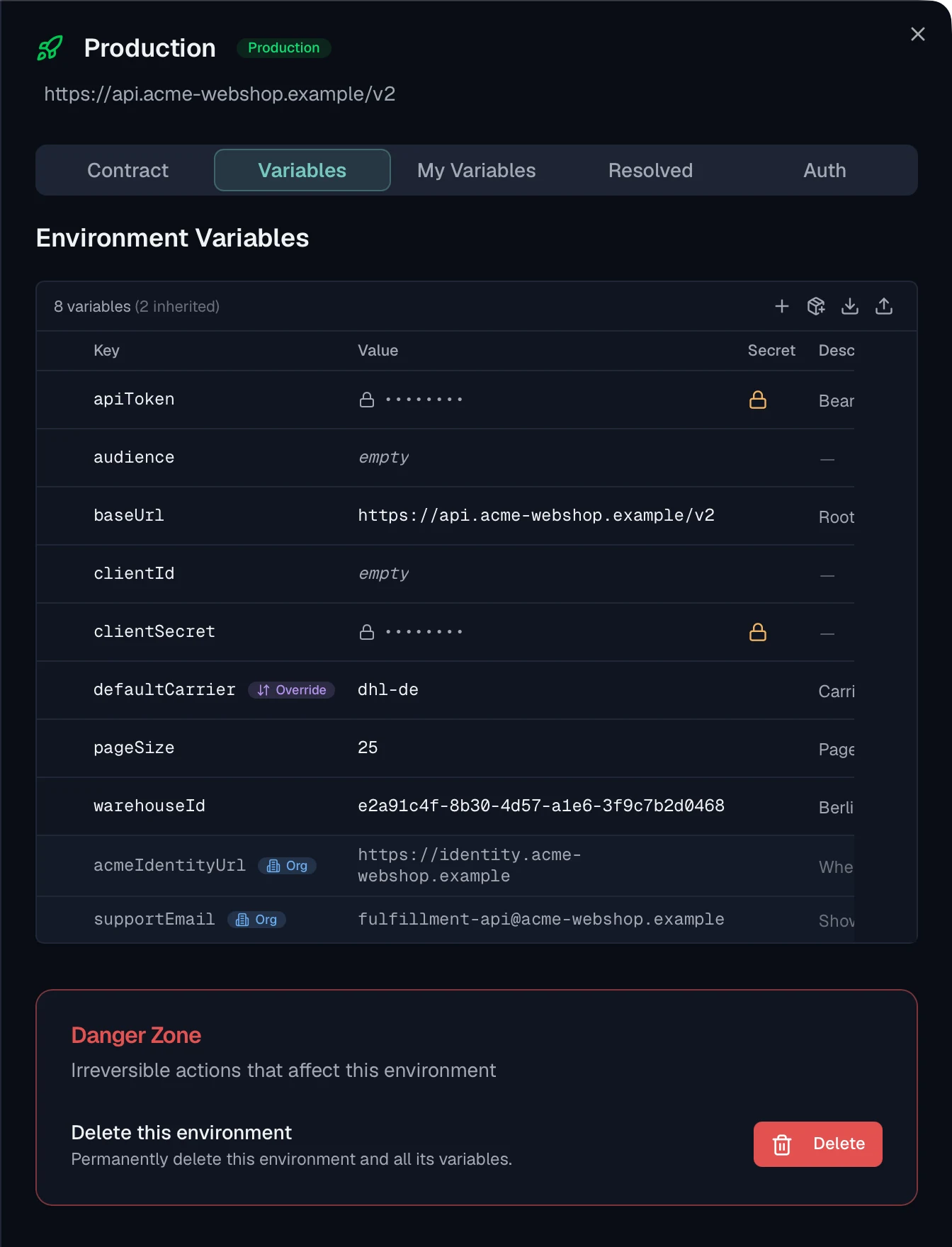
Environments in Routebase carry their own base URL, their own variables and their own authentication configuration, and every test request reaches the base URL as {{baseUrl}}. The same suite therefore runs against development, staging and production by switching the environment in the toolbar, with nothing in the cases to edit.
Authentication is configured on the environment's Auth tab and inherited by suites, which show a badge naming what they inherited. A suite overrides it with Custom Auth or switches it off with No Auth, and the inheritance badges are colour-coded across the testing surface. Test Authentication sends a probe request with the configured credentials and reports the status, the status text and the response time. That is a quicker way to find a wrong client secret than a failing suite.
Every credential field accepts a {{VARIABLE}} placeholder with autocomplete from the environment's variables, and secret variables follow the same encryption and masking rules everywhere. Copying an auth configuration to another environment masks the secrets and never carries OAuth tokens across. The copy is refused outright when the source holds a literal secret, with a message saying to configure that target by hand. That refusal is the product making the portable choice the easy one.
An environment can be marked read-only under its Contract tab, and only GET, HEAD and OPTIONS may then be sent there. Everything else is refused before the URL is parsed and before a socket opens, so a blocked request leaves no trace on the target. The case is reported as Blocked with a muted badge and its own counter, and it is never folded into the failed count. A run in which nothing was sent comes back as a neutral notice and not a success.
See Environments and Project Auth for the full picture.
Frequently asked questions
How do you run the same API tests against multiple environments?
Keep everything environment-specific out of the test. The base URL, the credentials and any values that differ per stage live in the environment, and the test refers to them through placeholders. A case whose URL reads as a base-URL variable followed by a path then runs unchanged against development, staging and production, because only the environment behind it changes.
Should you run API tests against production?
Run read-only checks there and nothing else. Synthetic monitoring and contract validation on GET requests tell you the truth about the live service and cost customers nothing. A suite that writes belongs in a staging or preview environment, and the safest way to enforce that is a guard on the environment itself rather than a convention people are expected to remember.
Where should API test credentials be stored?
In secret variables scoped to the environment, referenced from the auth configuration by name. The test then contains a reference rather than a value, so nothing sensitive lands in an export, a copy between environments or a screenshot. A credential typed directly into a test is one that will eventually be committed, shared or pasted into a support ticket.
How does authentication inheritance work in a test suite?
Configure authentication once on the environment and let suites inherit it, so the same suite authenticates correctly wherever it runs. A suite that genuinely needs different credentials overrides the environment with its own configuration, and a suite testing the unauthenticated path switches authentication off entirely. Three levels are enough for almost every real setup.
Last reviewed by The Routebase Team.