
4.0 API Documentation
API documentation that never drifts
Routebase generates your API documentation from the spec as a branded, searchable docs portal that humans and agents can read.
14-day Pro trial — no credit card required.
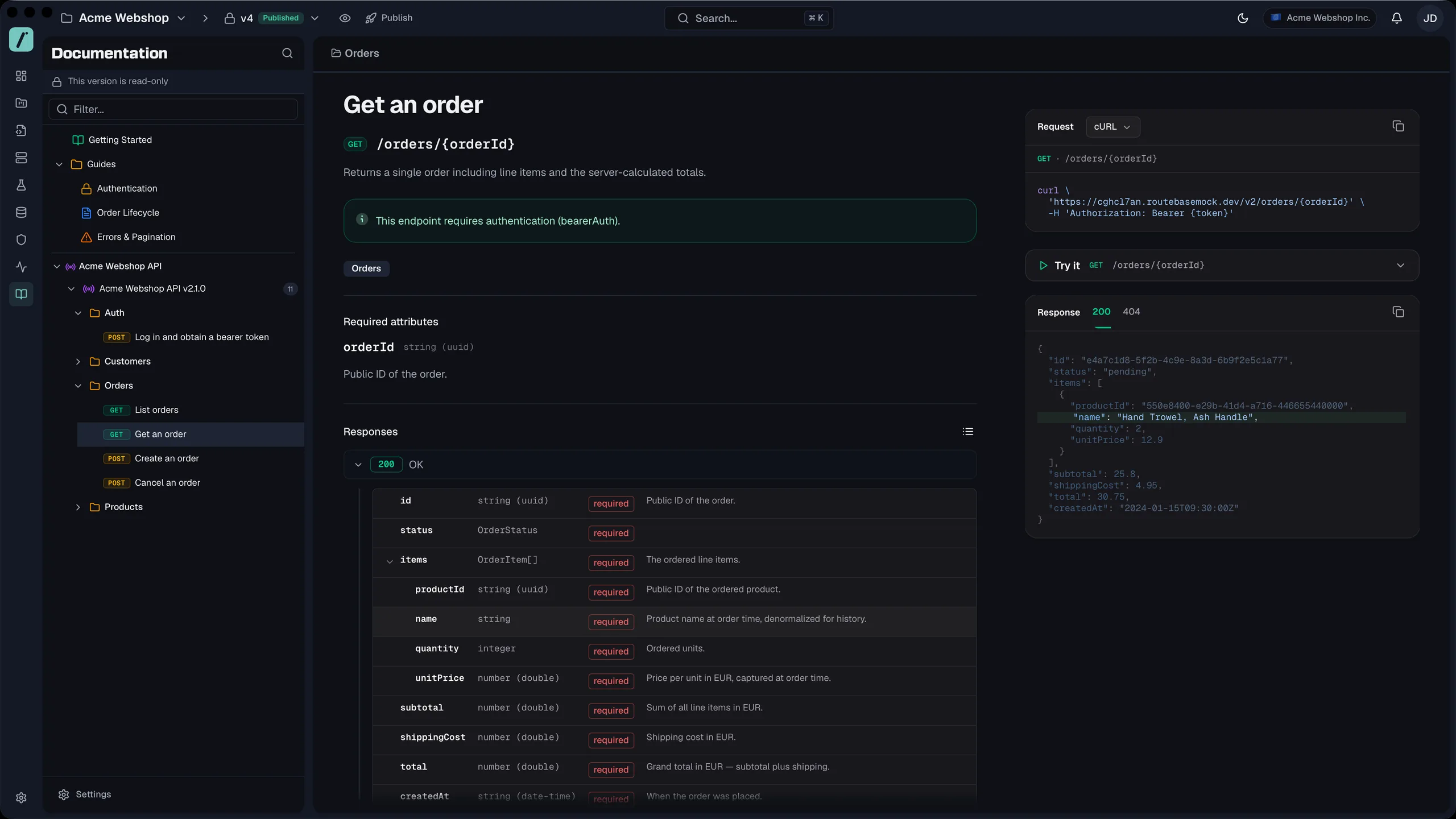
API documentation goes stale the moment the contract changes, because the docs are usually a copy that someone has to remember to update. Routebase generates the API docs from a published version of your OpenAPI spec, so the reference pages, the code examples and the try-it console describe exactly that contract. A newer version shows up as an update you review and publish, never as a silent change. The portal carries your name rather than your vendor's, with your branding and a custom domain that gets its SSL certificate automatically. Readers search across the portal and try requests with their own credentials, and agents read the same content through the llms.txt every published docs site serves. Because the spec also drives your mocks and tests, the API documentation is one output of the contract instead of a second thing to maintain.
API documentation as a portal, not a PDF
A portal build turns a published documentation version into a static site served through Azure Front Door. The API reference comes from a snapshot of a published spec version, so a newer spec shows an update banner in the editor instead of changing live docs. The site carries your branding, and on Pro it runs on your own domain.
- Nine themes, your logo, colors and fonts, plus custom CSS
- A subdomain under docs.routebase.dev, or your own domain with a managed SSL certificate on Pro
- Sitemap with lastmod, canonical tags and structured data on every page
Readers can try it
Every endpoint page carries a try-it console that sends the request straight from the reader's browser. It offers the environments you choose to publish, falls back to the servers in the spec, and prefills authentication from the security scheme. Code examples sit next to it in nine languages, and you choose which ones appear.
- Bearer, Basic and API key authentication, in a header, query or cookie
- Code examples in cURL, HTTPie, JavaScript, Python, C#, Go, Java, Ruby and PHP
Findable and structured
Search runs in the browser over an index built with the portal, and it opens from the keyboard with Cmd+K or Ctrl+K. Pages use components for the structures documentation keeps repeating, and a snippet written once is resolved into every page at build time.
- Client-side search with keyboard navigation
- Callouts, tabs, steps, accordions, code groups, cards and Mermaid diagrams
- Snippets that nest and take arguments
Ready for AI agents
Every published portal answers AI agents in the format they read best, so an agent that asks for Markdown gets the Markdown version of the page at the same URL. Each build also emits an llms.txt index, an llms-full.txt export and a Markdown twin of every page, and a build that is missing them fails. An Agent Readiness check scores the published portal against the open Agent-Friendly Docs Spec and shows which open checks your content decides and which ones Routebase already handles.
- Markdown at the same URL for any agent that asks for it
- llms.txt, llms-full.txt and a Markdown twin of every page
- An Agent Readiness score per portal, on every plan
- Copy as Markdown, Open in ChatGPT and Open in Claude on every page
- Portal pages as an MCP resource for your team's agents
Learn from your readers
Readers rate a page with a thumbs up or down and can add a comment, and their IP address is stored only as a hash. Analytics counts page views and visitors, records what people searched for, and lists the searches that found nothing as content gaps.
- Page feedback with an optional comment, rate-limited per reader
- Top pages, top search terms and zero-result searches
Frequently asked questions
How is the API documentation generated?
The API reference is generated from a published version of your OpenAPI spec, so every endpoint, parameter and response field appears with its type and description. When the spec moves on, the editor shows an update banner, and the docs change once you take the update and publish a new documentation version.
Can I host the API docs on my own domain?
Yes, on the Pro plan and above. Connect a custom domain and Routebase provisions the SSL certificate, and the portal carries your logo, colors and fonts rather than a vendor's branding. Every portal also gets a subdomain under docs.routebase.dev.
Can readers try requests from the docs?
Yes. Every endpoint page has a try-it console that sends the request from the reader's browser with Bearer, Basic or API key authentication. Code examples sit next to it in cURL, HTTPie, JavaScript, Python, C#, Go, Java, Ruby and PHP.
Can AI agents read the documentation?
Yes. Every published portal serves an llms.txt index, an llms-full.txt export and a Markdown version of every page, and an agent that asks for Markdown receives it at the same URL as the HTML page. An Agent Readiness check in the portal settings scores the portal against the open Agent-Friendly Docs Spec and points to anything your content still needs. Your own team's agents also reach the pages through the Routebase MCP server.
One living spec
The rest of the lifecycle
Every stage below works from the same spec, so a change is made once and published once.
Ready to ship on it?
Routebase is live. Design your API once — docs, mocks, tests, and monitoring all follow from the same source.
14-day Pro trial — no credit card required.