
Chapter 04 of 09
API Incidents and Maintenance Windows
When failed checks should become an incident, what acknowledging means, and how to schedule planned work without teaching anyone to mute the channel.
An alert tells you something is happening. An incident is what you open when it keeps happening, and it exists so that the second person to look at the problem does not start from nothing.
What an incident adds
An alert has no memory. It fires, it lands somewhere, and the next one looks exactly the same whether it is the first or the fortieth.
An incident carries the four things a message cannot. It has a start time that does not move and a state that says whether anybody has picked it up. It also has a duration that keeps counting while the problem is open, and a timeline of what happened in what order. That last one is the artefact you want the next morning, when somebody asks how long the outage really lasted.
When one opens
The threshold that opens an incident is the point where a transient cause stops being the likely explanation. For most APIs that is three consecutive failed checks, and two factors move it.
The check interval multiplies the threshold into real time. Three failures at a five-minute interval means an incident opens fifteen minutes after the service stopped answering, so a path where that is too slow needs a shorter interval rather than a lower threshold.
What else is running should suppress it entirely. A monitor inside an active maintenance window and a monitor that is disabled both have good reasons not to open anything.
Three states, and what they promise
The lifecycle is short on purpose, because a workflow with seven states is a workflow people route around.
| State | Means | Does not mean |
|---|---|---|
| Open | Nobody has taken it on yet | Nobody has noticed |
| Acknowledged | A specific person is working on it | The problem is smaller than it looked |
| Resolved | The underlying cause is cleared | The alert stopped firing |
The distinction between acknowledged and resolved is the one that decays first in practice. If people acknowledge to stop the noise, the state stops meaning anything, and the fix is in the alert rules rather than in the workflow. A channel that is quiet enough to read is a channel where acknowledging costs nothing to do honestly.
Maintenance windows
Planned work produces failures that are expected, and a monitoring setup that pages anyway has one predictable outcome. The channel gets muted during the deployment, and somebody forgets to unmute it.
A maintenance window suppresses the consequence rather than the measurement. Checks keep running, results keep being recorded, and failures inside the window simply do not open incidents. The difference matters the morning after, because a deployment that broke something leaves a visible trail instead of a gap.
Three properties decide whether windows get used at all.
Scope. A full-stack deployment takes an environment down, not one endpoint, so scheduling has to work at the level of an environment or a specification rather than monitor by monitor.
Recurrence. Weekly deployments and monthly patch nights are the common case, and anything that has to be scheduled by hand every week eventually is not.
Honesty about the numbers. Decide once whether suppressed failures count against uptime, and say so wherever the figure is published. Excluding planned windows from an SLA is normal and defensible, while quietly excluding them from an internal dashboard is how a team stops believing its own graphs.
In Routebase
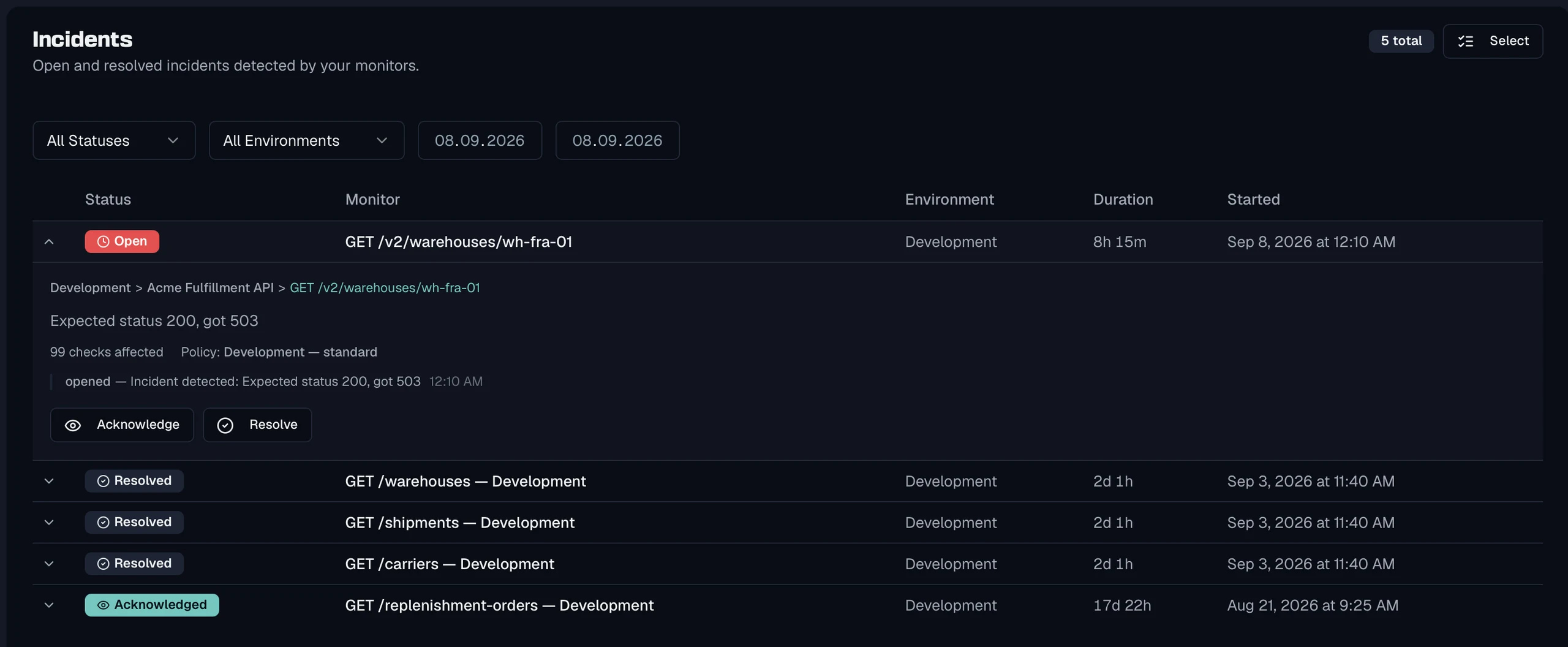
An incident opens once a monitor crosses the project's incident threshold, which defaults to three consecutive failed checks and is configurable from 1 to 100. Incidents move through open, acknowledged and resolved, and each one carries the environment, the specification, the monitor, the cause, how many checks were affected and which alert policy triggered it.
Maintenance windows are scheduled against a monitor, a specification or an environment. A window is either a one-off period or a recurring template such as a weekly Tuesday deployment slot, with a custom cron expression for anything else. While a window is active, failed checks do not open incidents, the affected monitors are marked in the tree, and the dashboard lists what is currently suppressed with its end time. Checks keep running throughout.
See Incidents and Maintenance Windows.
Frequently asked questions
What is the difference between an alert and an incident?
An alert is a message that fires when a rule matches, and it has no memory. An incident is a record with a start time, a state, an owner and a timeline, which is what you need when the same problem lasts three hours and four people work on it. Alerts are how you find out, and incidents are how you keep track.
When should a failed check open an incident?
Once enough consecutive checks have failed that a transient cause is unlikely, which for most APIs is three. The threshold interacts with your check interval, so three failures at five minutes means an incident opens a quarter of an hour after the service went down. Lower the interval rather than the threshold when that is too slow.
What does acknowledging an incident mean?
It means a specific person has seen it and is working on it, which is a different statement from the problem being over. Treating acknowledge as a way to silence a noisy alert destroys the only signal that separates an unhandled incident from a handled one. If people use it that way, the alerting is too noisy rather than the workflow being wrong.
Do maintenance windows stop monitoring?
They should suppress the consequences rather than the measurement. Checks keep running so you still have the history afterwards, and failures during the window simply do not open incidents or page anyone. That way a deployment that broke something is visible in the timeline the moment the window ends, instead of being a gap in the record.
Last reviewed by The Routebase Team.