
Chapter 05 of 10
Parameters, Request Bodies and Responses
The four parameter locations, how a request body is described, responses per status code with headers and examples, and the errors documents omit.
An operation has three moving parts, which are what goes in as parameters, what goes in as a body, and what comes back. Most documents get the first two roughly right and leave the third half finished.
The four parameter locations
| Location | Where the value travels | Required |
|---|---|---|
path | Inside the URL, filling a {variable} in the template | Always |
query | After the question mark | Optional unless marked |
header | An HTTP request header | Optional unless marked |
cookie | Inside the cookie header | Optional unless marked |
Path parameters are always required, because the URL means nothing without them, and the specification says so rather than leaving it to convention. Every {variable} in a path has to have a matching declaration, and a mismatch is one of the few things a validator catches without any judgement involved.
parameters:
  - name: orderId
    in: path
    required: true
    description: Public identifier of the order.
    schema:
      type: string
      format: uuid
  - name: pageSize
    in: query
    description: Items per page, from 1 to 100.
    schema:
      type: integer
      format: int32
      minimum: 1
      maximum: 100
      default: 20
Three small habits pay for themselves here. Give every parameter a description, because the name alone rarely says what a value is for. Give optional parameters a default where one exists, since a reader otherwise has to guess what happens when they leave it out. And put real bounds on anything numeric, because maximum: 100 documents a limit that your service already enforces silently.
Header parameters have one trap. The specification says that a header parameter named Accept, Content-Type or Authorization is ignored, because those are described by the content map and by the security schemes instead.
Request bodies
In OpenAPI 3 a body is not a parameter. It is its own field on the operation, with a required flag and a map keyed by media type.
requestBody:
  required: true
  description: The order to place.
  content:
    application/json:
      schema:
        $ref: "#/components/schemas/CreateOrderRequest"
      examples:
        minimal:
          summary: One line item, no shipping options
          value:
            customerId: 550e8400-e29b-41d4-a716-446655440000
            items:
              - productId: 7c9e6679-7425-40de-944b-e07fc1f90ae7
                quantity: 2
The media type map is the point of the structure. An operation that accepts JSON and multipart form data describes both under the same body, each with its own schema, instead of pretending there is one shape.
Note that examples in the plural is a map of named examples, while example in the singular is a single value. Named examples are worth the extra nesting, because a reader learns more from a minimal case and a full case than from one example trying to be both.
Responses per status code
Responses are keyed by status code as a string, plus an optional default for everything not listed. Each one needs a description, and each one that has a body needs a schema.
responses:
  "201":
    description: The order was created and priced.
    headers:
      Location:
        description: URL of the created order.
        schema:
          type: string
          format: uri
    content:
      application/json:
        schema:
          $ref: "#/components/schemas/Order"
  "422":
    description: The order was rejected because an item is out of stock.
    content:
      application/problem+json:
        schema:
          $ref: "#/components/schemas/Problem"
The quotes around the status code are not decoration. In YAML a bare 201 is a number, and the specification defines these keys as strings, so quoting them avoids a class of parser disagreement that is tedious to debug.
The part most documents skip
Error responses are where a reference stops being a list of endpoints and starts being useful.
A document that lists only the success case tells a client author nothing about what to do when the call fails, so they find out in production. The useful minimum per operation is one response for a rejected credential, one for a malformed or invalid request, and one for a missing resource where that can happen.
Two things make those responses worth reading. The description should say what caused the failure and what the caller can do about it, rather than repeating the name of the status code. And the body should be a shared schema rather than a fresh shape per endpoint, so a client can write one error handler. RFC 9457 defines problem details and the application/problem+json media type for exactly this, and it obsoleted the older RFC 7807 in July 2023.
Response headers
Headers on a response are documented in their own map, and they are the place where operational behaviour becomes visible. A Location on a created resource, rate-limit headers on a success and a correlation identifier on an error are all part of the contract, even though nobody thinks of them as part of the body.
They are also the most duplicated part of a document, because the same three headers appear on every response. That is what components and header policies are for, which the reuse chapter covers.
In Routebase
Parameters are a table on the operation, and the designer keeps path parameters in step with the URL. Add {orderId} to the path and the parameter appears, remove it and the parameter goes, and a path parameter is marked required automatically because it cannot be anything else.
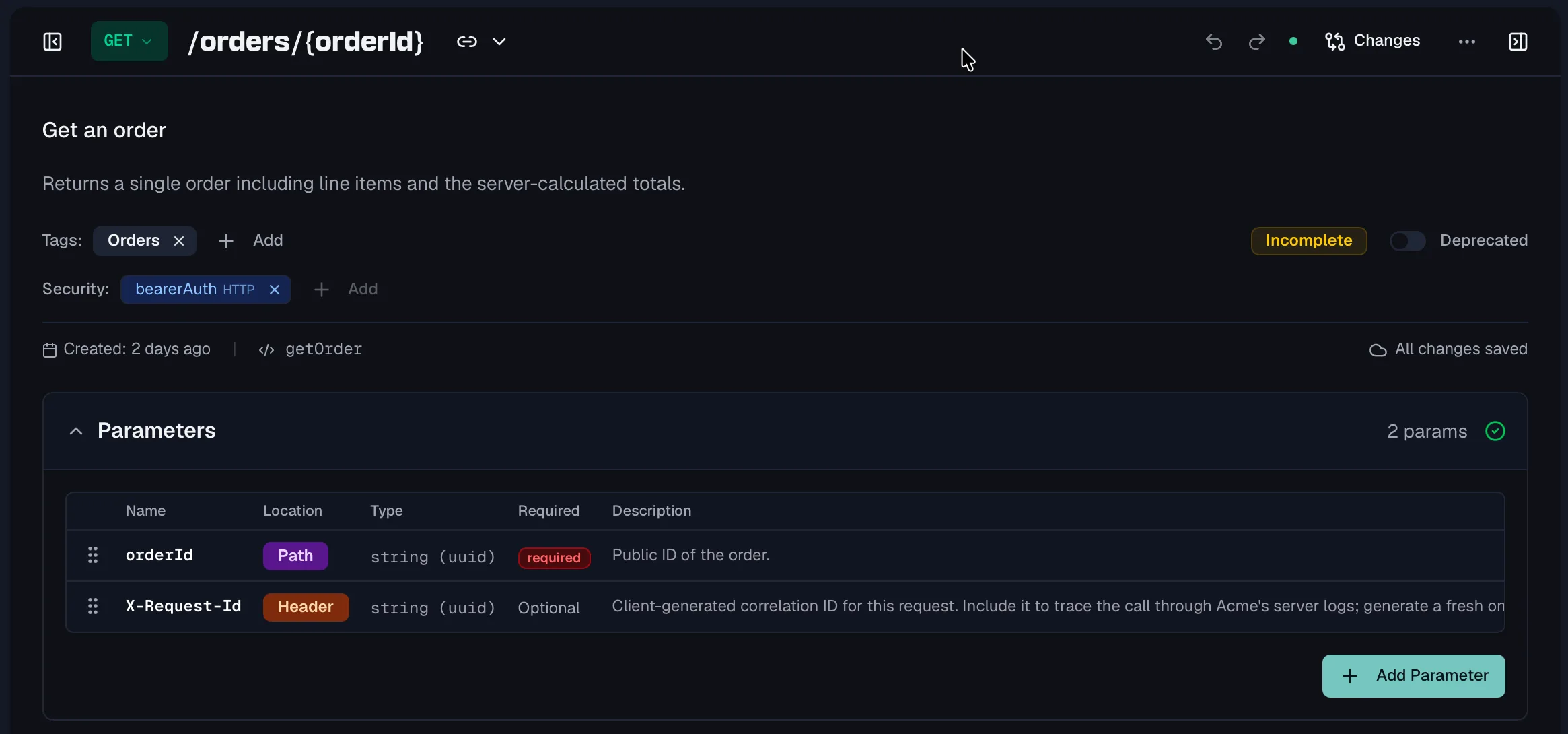
Responses are added per status code, and a quick-add scaffolds the set that matches the method, so a POST starts with its created case and its four failure cases rather than with one success. Response headers can be defined inline, linked to a reusable header component or inherited from a header policy, and each inherited one can be overridden or excluded per response. The Parameters, Responses and Header Policies guides cover the three surfaces.
Frequently asked questions
What are the parameter locations in OpenAPI?
There are four, which are path, query, header and cookie. A path parameter fills a variable in the URL template and is always required. A query parameter follows the question mark. A header parameter is an HTTP request header, and a cookie parameter travels in the cookie header. OpenAPI 3.2 adds a fifth location, querystring, which describes the whole query string as one value.
How do you define a request body in OpenAPI 3?
A request body is its own object on the operation rather than a parameter, which is one of the changes version 3 made. It carries a description, a required flag and a content map keyed by media type, and each media type entry holds a schema and optional examples. That structure is what lets one operation accept JSON and form data with different shapes.
Should every endpoint document its error responses?
Yes, because a consumer writing a client has to decide what to do when the call fails, and an undocumented failure becomes a guess. The useful minimum is one authentication failure, one validation failure and one not-found where it applies, each with a body schema and a description that says what caused it and what to try next.
Can one response have several content types?
Yes. The content field of a response is a map keyed by media type, so a single status code can describe a JSON body and a CSV body with different schemas. The same applies to request bodies, which is how an operation documents that it accepts both JSON and multipart form data.
Last reviewed by The Routebase Team.