
Chapter 02 of 10
Anatomy of an OpenAPI Document
Every top-level field of an OpenAPI document explained in the order you meet it, with one complete working example and the difference between YAML and JSON.
An OpenAPI document is one object with fewer top-level fields than people expect. Once you can name all of them, reading somebody else's specification stops being an exercise in scrolling.
The top-level fields
| Field | What it holds |
|---|---|
openapi | The version of the specification this document is written against |
info | Title, version, description, contact, license |
servers | The base URLs the API is reachable at, with optional variables |
paths | One entry per route, each holding its operations |
webhooks | Incoming webhooks the API may send, added in 3.1 |
components | Reusable schemas, responses, parameters, headers and security schemes |
security | The authentication that applies unless an operation overrides it |
tags | Named groups with descriptions, used to organise the reference |
externalDocs | A link to documentation that lives elsewhere |
Two of these are worth stating plainly. The openapi field describes the file format and has nothing to do with your API, while info.version describes the document. The specification is explicit that info.version is distinct from the specification version and from the version of the API being described, so a document can say 2.3.0 while your consumers call /v2.
A complete example
The following document is small enough to read and complete enough to run through a validator, a documentation generator and a mock server without additions.
openapi: 3.1.0
info:
  title: Acme Orders API
  version: 2.3.0
  summary: Place and retrieve customer orders.
  description: |
    Orders are priced by the server at the time they are placed, so the
    totals in the response are authoritative.
  license:
    name: Apache-2.0
    identifier: Apache-2.0
servers:
  - url: https://api.acme.example/v2
    description: Production
  - url: https://sandbox.api.acme.example/v2
    description: Sandbox
tags:
  - name: Orders
    description: Creating, reading and cancelling customer orders.
security:
  - bearerAuth: []
paths:
  /orders/{orderId}:
    get:
      operationId: getOrder
      summary: Get an order
      description: Returns one order including its line items and totals.
      tags: [Orders]
      parameters:
        - name: orderId
          in: path
          required: true
          description: Public identifier of the order.
          schema:
            type: string
            format: uuid
      responses:
        "200":
          description: The order was found.
          content:
            application/json:
              schema:
                $ref: "#/components/schemas/Order"
        "404":
          $ref: "#/components/responses/NotFound"
components:
  securitySchemes:
    bearerAuth:
      type: http
      scheme: bearer
      bearerFormat: JWT
  responses:
    NotFound:
      description: No order exists with that identifier.
      content:
        application/problem+json:
          schema:
            $ref: "#/components/schemas/Problem"
  schemas:
    Order:
      type: object
      description: A customer order with line items and server-calculated totals.
      required: [id, status, total, currency, createdAt]
      properties:
        id:
          type: string
          format: uuid
        status:
          type: string
          enum: [PENDING, PAID, SHIPPED, CANCELLED]
          description: Where the order currently is in fulfilment.
        total:
          type: number
          format: double
          description: Grand total including shipping.
        currency:
          type: string
          description: ISO 4217 code the totals are expressed in.
        createdAt:
          type: string
          format: date-time
    Problem:
      type: object
      description: RFC 9457 problem details.
      required: [type, title, status]
      properties:
        type:
          type: string
          format: uri
        title:
          type: string
        status:
          type: integer
        detail:
          type: string
Reading it from the top
The version marker tells a parser how to read everything below it, so it is the first thing any tool looks at.
The info block is what shows up as the title of your reference documentation. The summary field and the SPDX identifier under license were both added in 3.1, so a 3.0 document uses description and a license url instead.
Servers are a list rather than a single value, which is how one document covers production and a sandbox. Variables in a server URL let you leave a region or a tenant open for the reader to fill in.
Paths hold the actual API. Each key is a URL template, each entry under it is an HTTP method, and the object under that method is what the specification calls an operation. The template variables in braces have to match declared path parameters, and a validator will tell you when they do not.
Components hold everything you reference more than once, addressed through $ref with a pointer such as #/components/schemas/Order. The reuse chapter covers when extracting something is worth it.
Security at the top level applies to every operation, and an operation can override it with its own list. An empty list on an operation makes it public, which is the only way to say that explicitly. OpenAPI security schemes covers the types and their fields.
Tags do more than group things
Tags look like filter chips and behave like structure. Most reference renderers group operations by their first tag and use the matching entry in the top-level tags list for the section introduction.
That makes a tag description part of your published documentation rather than an internal label. A document with eight tags and no descriptions produces eight unexplained headings, and nobody notices until it is live.
YAML or JSON
Both are valid and interchangeable, since YAML is a superset of JSON for these purposes and every parser accepts either.
YAML wins on review, because it carries comments and produces diffs a human can read. JSON wins on tooling, because it is what most generators emit and what every language parses without a dependency. Teams that write by hand tend to keep YAML in the repository and let anything downstream take whichever form it asks for.
The one thing to watch in YAML is that status codes and version strings are quoted. Written bare, 200 is a number and 3.10 would be read as a float, which is why the example above quotes both.
In Routebase
Routebase edits the same structure through a designer rather than through the file. An operation opens with its method and path at the top, and the parameter block and the response block below it are the same two halves of the contract that the YAML has.
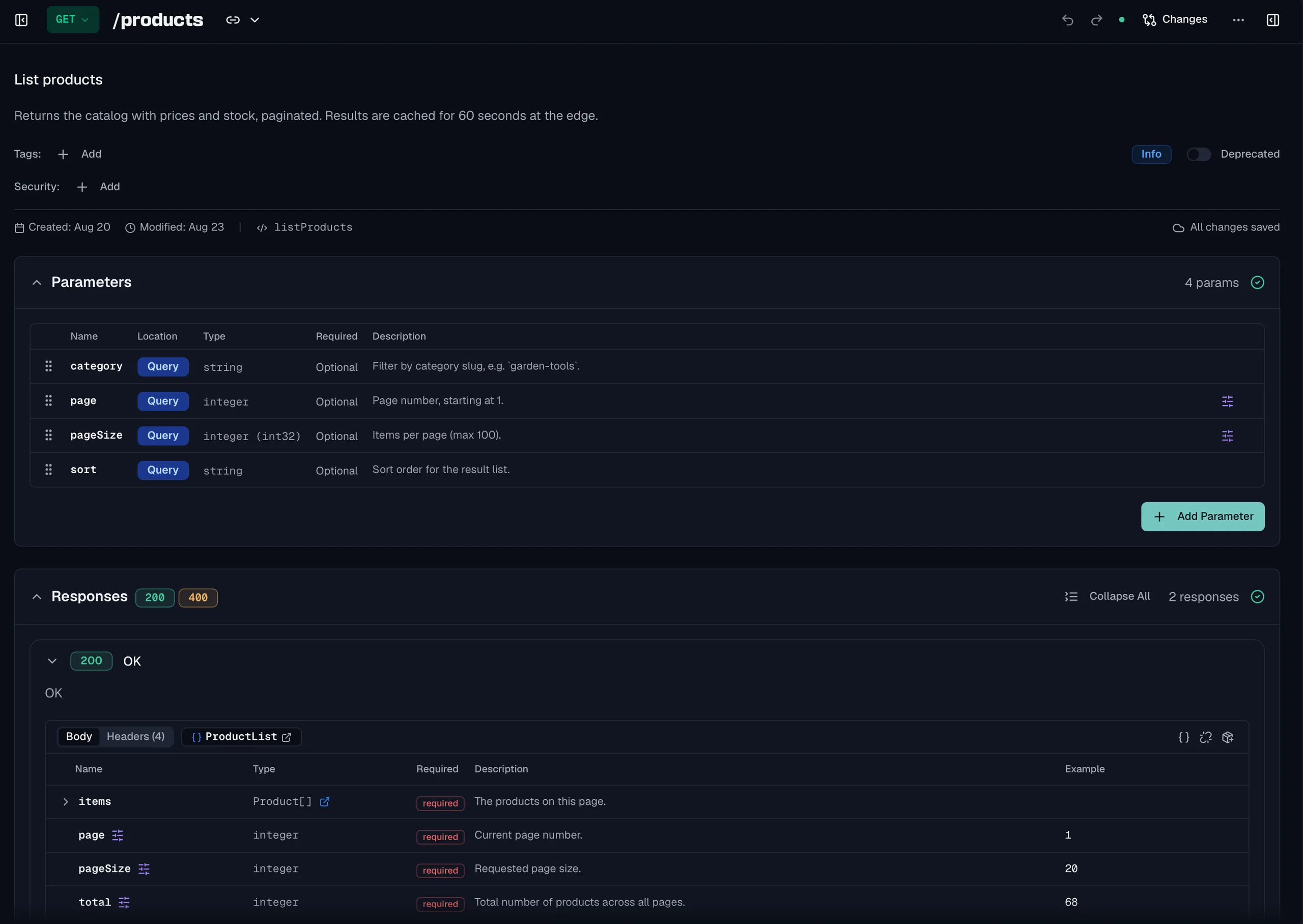
The raw document stays one click away in the preview panel, and every frozen version downloads as YAML or JSON with tag descriptions, enum labels and deprecation metadata included. The Endpoints guide covers the editor, and Import and Export covers what travels with the file.
Frequently asked questions
What are the parts of an OpenAPI document?
A document has a version marker at the root and an info block that names and versions it. Below those sit a servers list of base URLs, a paths object holding one entry per route, and a components object holding the definitions you reference more than once. Tags, security and external documentation are optional additions that most real documents end up using.
What is the difference between a path, an operation and an endpoint?
A path is a URL template such as /orders/{orderId}. An operation is one HTTP method on that path, so GET and DELETE on the same path are two operations. The word endpoint is not a field in the specification at all, and people use it to mean either of the two, which is why it is worth saying method and path when precision matters.
Is the paths field required in OpenAPI?
Not since version 3.1. A 3.1 document must contain at least one of paths, components or webhooks, which is what allows a document that only describes incoming webhooks or only publishes reusable schemas. In OpenAPI 3.0 the paths field is required, although it may be empty.
Can I split an OpenAPI document across several files?
Yes, because a reference can point at another document rather than at a location inside the current one. Splitting helps when several teams own different parts, and it costs you the ability to hand somebody one file. Most tooling resolves external references, so check the tools you actually use before committing to the layout.
Last reviewed by The Routebase Team.