
Chapter 08 of 12
Running a Scan Against a Live API
What a scan needs before it starts, what it does to the system it is pointed at, and why concurrency, delay and a time budget are courtesy settings rather than performance settings.
A scan is not an analysis. It is traffic, sent deliberately, at a system that will react to it, and that framing decides most of the configuration.
The four things a scan needs
A reachable target. The scanner runs somewhere and the API has to answer it, which means a deployed staging, preview or demo environment rather than a service bound to localhost. This is the most common reason a first scan finds nothing.
A description of the surface. Without one, a scanner has to discover endpoints, and an API does not link to itself the way a website does. With a specification it knows every path, method, parameter and body schema, so it can send probes that fit the endpoint instead of generic noise. That difference shows up directly in the false-positive rate.
Identities. Everything in the object and function and property chapters needs credentials, usually two sets with a real gap between them. Without identities, the authorization scanners have nothing to compare and quietly do nothing.
A budget. Concurrency, delay between requests and a wall-clock limit decide whether a scan is a background hum or a load test nobody scheduled.
What a scan does to the thing it scans
Being specific about this is what makes the difference between a scan that runs weekly and a scan that runs once.
Reads are cheap and writes are not. The create-then-read method for object level authorization has to create something, and what it creates is a real record in the target environment. On a system with downstream effects, such as a webhook on creation or an email on signup, those effects happen too.
Fuzzing is load by design. A fuzzer sends many mutated requests per endpoint on purpose, so pointing one at anything shared is how you become the incident you were trying to prevent.
Testing a limit means exceeding it. There is no way to observe a rate limit without crossing it, which is why that probe belongs behind a switch and on an environment you own.
Some checks are naturally safe. A missing header, a wildcard CORS policy, a deprecated TLS version and an old version still answering are each observable with one ordinary request. Those belong in the pass that runs on every change.
Pacing is a courtesy setting
Three numbers control how hard a scan pushes, and they are worth setting deliberately.
Concurrency decides how many requests are in flight at once, delay decides the minimum gap between consecutive requests, and the time budget decides when the scan stops regardless of what is left. Lower concurrency with a higher delay is gentler, so anything sharing infrastructure with something that matters gets conservative values.
The time budget has a second job. It makes an unbounded scan impossible, so a large surface produces a partial result on time instead of a complete result eventually.
Two profiles, not one
Most teams end up with two configurations, because the pull request pass and the thorough pass have incompatible requirements.
| On every change | Nightly or weekly | |
|---|---|---|
| Scanners | The passive checks | Everything, including authorization and fuzzing |
| Target | Preview or staging | Staging you own |
| Budget | Short enough to finish inside a review wait | Long enough to be thorough |
| Load probes | Off | On, where the environment is yours |
The pull request pass exists to catch a regression while the change is still in review, so it is worth keeping it small enough that nobody is tempted to skip it. The thorough pass has all night.
In Routebase
A scan profile is the saved configuration, and it names the target environment, the API specification, the scanners to run, the personas assigned to each one that needs them and the pacing.
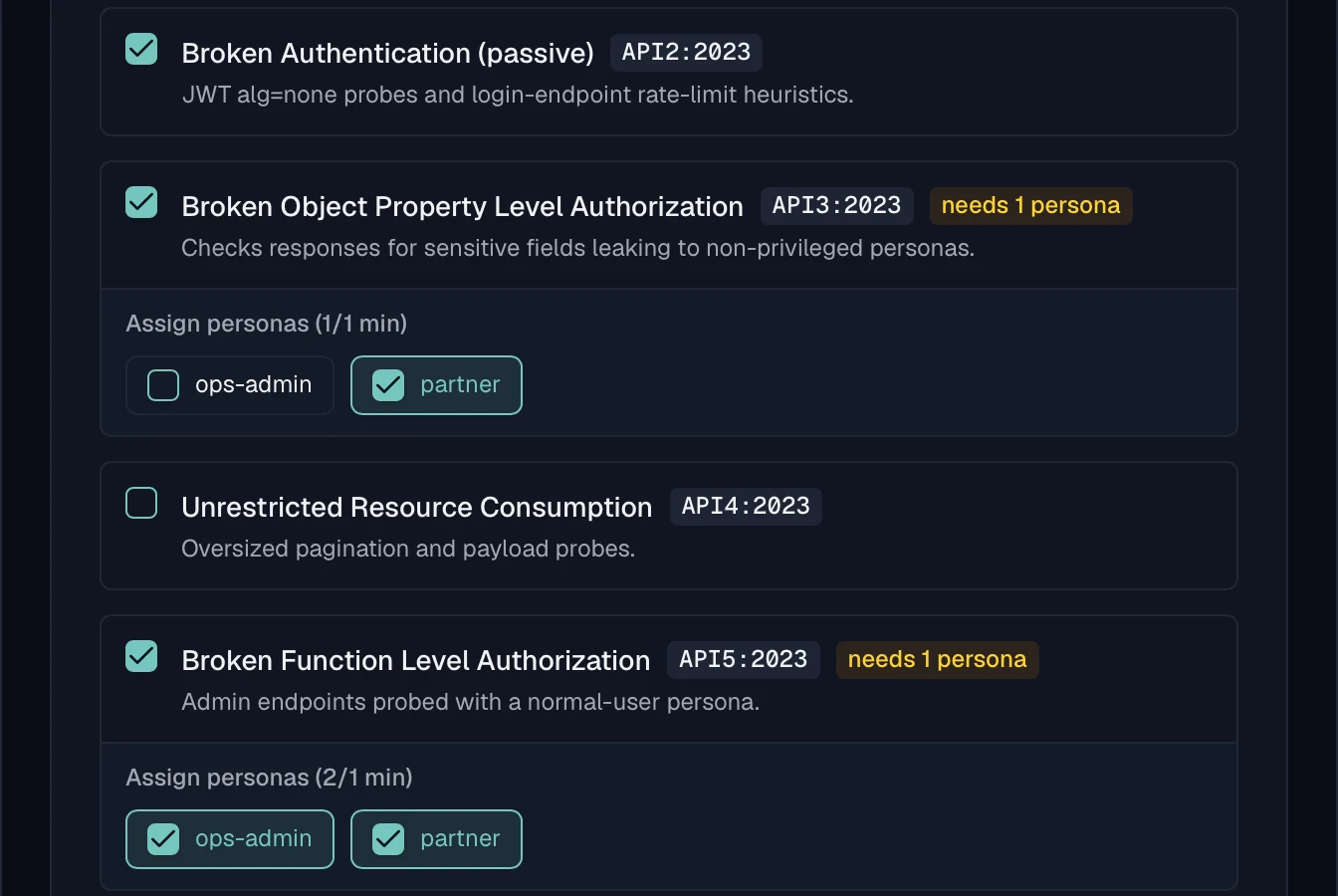
Three settings control the pacing. Max concurrent requests defaults to five in a range of one to fifty, and Request delay defaults to two hundred milliseconds. The Time budget defaults to six hundred seconds and is configurable from thirty seconds to an hour. When the budget is reached the scan stops and keeps the results it has.
Two settings are off until you turn them on, and both are off because they generate load. Enable rate-limit probe adds the burst check described in resource consumption, and Fuzzing intensity gates the two fuzzing scanners, which send no requests at all while it reads Off. Selecting a fuzzer without raising the intensity does nothing, which is deliberate.
A profile runs on demand or on a cron schedule of its own, and a run shows its status, a progress bar measured in scanners completed, and counters for checks, passed, failed and open findings. Cancelling is cooperative, so work already in flight finishes and every finding detected up to that point is kept rather than discarded.
Some limits are fixed rather than configurable. A scan processes up to five hundred endpoints, and a project holds up to ten personas and up to ten profiles on Pro. A project stores up to ten thousand findings, after which the oldest resolved ones are archived and open ones never are. See Scan Profiles and Security Overview.
Frequently asked questions
What do you need before running an API security scan?
Four things. A target the scanner can reach, which means a deployed environment rather than something on your laptop. A description of the surface, so probes go to real endpoints with real parameters. Credentials for the authorization checks, which means at least two identities. And a limit on how hard the scan is allowed to push, because a scan is traffic.
Can you run a security scan against production?
The passive checks are usually safe anywhere, while anything that generates load belongs on an environment you own and can restart. The deciding question is what happens if a probe succeeds, since a write that lands in production is a real record and a burst that trips a limit is a real outage. Run the full profile against staging and keep production to the read-only checks.
How long does an API security scan take?
It depends on the number of endpoints, the scanners enabled and the pacing you chose, so it is bounded by the time budget rather than predictable from the surface. A wall-clock budget matters more than the exact number, because a scan that has to finish inside a pull request needs a different configuration from one that runs overnight.
Is it legal to scan an API you do not own?
Point scans only at systems you own or have written permission to test. That covers your own deployments and a provider that has given you an agreed testing window, and it does not cover a third-party API you happen to integrate with. Unauthorised scanning is the kind of question that ends up with lawyers rather than engineers.
Last reviewed by The Routebase Team.