
Chapter 06 of 10
Publishing and Hosting API Documentation
Where documentation lives, subdomain against your own domain, who may read it, how to take a version back, and the settings that decide how it is found.
Documentation that is not reachable is not documentation. This chapter is about the step between having the content and having a site your readers can open.
Reachability is the first requirement
The reader you care about most has not signed up yet. They are deciding whether your API can do the thing they need, and they are doing it from a search result.
That rules out a few common arrangements. Documentation behind the product login excludes exactly that reader. Documentation in a wiki that requires an account does the same. Documentation in a repository is readable but arrives without search, without navigation and without a version switcher, so it works for contributors and not for consumers.
Subdomain or subfolder
Two addresses are conventional, and both are defensible.
A subdomain such as docs.example.com is what most teams use. The documentation is usually a separate build with its own deploy cadence, and a subdomain keeps that separation clean.
A subfolder such as example.com/docs keeps everything on one host, which concentrates the search authority your content earns instead of splitting it. The cost is a proxy in front of two systems and a rewrite rule somebody has to maintain.
What matters more than the choice is that the address is yours. A documentation site on a vendor's domain sends the ranking and the links you earn to that vendor, and moving later costs you both.
Your own domain means DNS and a certificate
Serving on your own domain is a short sequence that people get wrong in the same three places.
You add a record pointing your subdomain at the host, you prove you own the domain, usually with a second record, and then a certificate is issued for it. DNS propagation takes minutes rather than seconds, so a verification that fails on the first attempt is usually not a mistake.
The two records for a fictional docs.example.com look like this in a zone file, with the target host and the token both supplied by whoever hosts the documentation.
docs.example.com.          3600  IN  CNAME  example-docs.hosting-provider.example.
_verify.docs.example.com.  3600  IN  TXT    "token-issued-by-the-host"
The part worth checking afterwards is monitoring. A certificate that is not renewed takes your documentation offline with a browser warning, which is the worst possible failure for a page whose job is establishing trust.
Internal and public are different audiences
Plenty of documentation is written for readers inside the company, and it stays useful only if it can say things a public page cannot.
That makes the boundary worth enforcing rather than remembering. Internal pages name internal hosts, describe unreleased work and sometimes explain why a design is the way it is. Publishing one of those by accident is not a formatting problem.
The arrangement that holds is one where publishing is an explicit action and where the default state of new content is not public. You also want to see at a glance which versions are readable from outside.
Be able to take it back
Two different situations get confused here.
Sometimes a single version has to stop being readable, for example because it went out early or because it describes an API that has been withdrawn. Sometimes the whole site has to go offline. The first is a visibility change and the second is a shutdown, and a platform that offers only deletion for either one leaves you rebuilding content to recover from a mistake.
Check which one you have before you need it.
Let the build tell you what happened
A documentation site is a deployment, so it deserves the things you expect from a deployment.
A record of what was built, when, from which version and with what result is what turns "the page is wrong" into an answer. A build log is what turns a failed publish into a fix. Without either, a stale portal looks identical to a portal that failed to build three days ago.
The settings that decide whether you are found
Two small things are easy to leave at their defaults and expensive to leave wrong.
The first is the metadata, meaning the title and the description that search engines and link previews use, plus a share image. A documentation site is a landing page for every search that ends in your API, and an empty description is a wasted result.
The second is scripts. Analytics and a support widget usually want a tag in the page, and a portal that offers no place for one leaves you choosing between measurement and a hosted site.
In Routebase
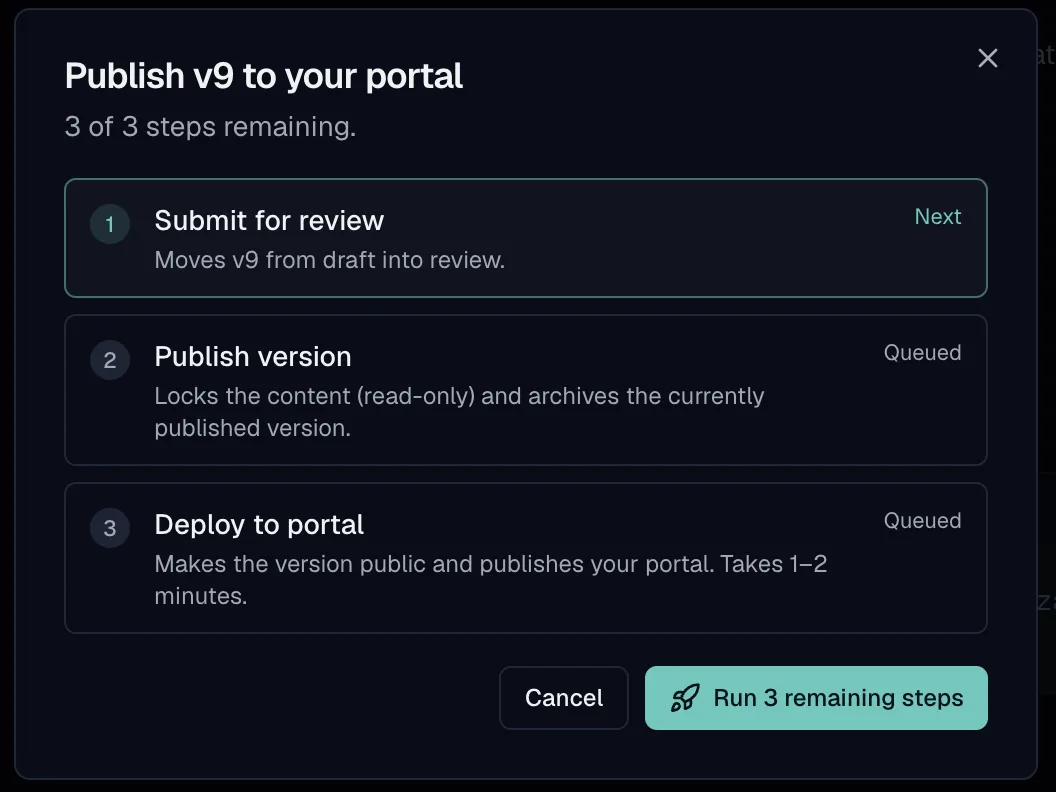
Publishing in Routebase runs as one guided flow rather than as three settings pages. The dialog shows the remaining steps for the version in front of you, moves it through review, locks the content, and deploys it to the portal.
Every portal gets a subdomain under docs.routebase.dev, and a custom domain can be connected on top. The app shows the DNS records to create, verifies them, and issues the certificate, after which it keeps checking the domain health. Published versions carry an internal or public flag, so a version can be live for your team without being deployed to the portal, and a public one can be pulled back. Build history keeps every build with its status and its log, and the advanced settings carry the title, the description, the share image and custom head or body scripts. The Publishing guide covers the flow, and Custom Domains covers the domain setup.
Frequently asked questions
Where should API documentation be hosted?
On a host your readers can reach without an account, on a subdomain of the domain they already associate with you. A documentation site behind the same login as the product locks out the person who is evaluating whether to sign up. A site on a vendor domain hands the search ranking you earn to somebody else.
Should docs be on a subdomain or a subfolder?
A subdomain such as docs.example.com is the common arrangement because the documentation is usually a separate build with its own deployment. A subfolder consolidates search authority onto one host, which is the argument for it, at the cost of a reverse proxy in front of two systems. Both work, so pick the one your infrastructure will keep working in two years.
How do internal and public API documentation differ?
In who may read them rather than in how they are written. Internal documentation can name internal hosts and describe unreleased work, which is exactly why it must not be published by accident. The safest arrangement is one where publishing is a deliberate step and where the default state of a new version is not public.
Can you unpublish API documentation?
You should be able to, and it is worth checking before you need it. Taking a version back covers two different cases, one where a single version should stop being readable and one where the whole site should go offline. A platform that only offers deletion for either leaves you rebuilding to recover.
Last reviewed by The Routebase Team.