
Chapter 04 of 10
Interactive API Documentation
What a try-it playground has to do to be useful, which servers and credentials it may carry, how code samples earn their place, and what must never reach a documentation page.
A reader who can send a request from the documentation page is a reader who stops reading and starts integrating. That is the whole argument for interactive documentation, and most of the work is making sure the request they send can succeed.
What the reader is being saved from
Without a playground the path from reading to trying has several steps. The reader copies a URL, opens another tool, retypes the parameters, works out which header carries the credential, and gets a 401 because they guessed the scheme.
Every one of those steps is a place to give up, and none of them teaches anything about your API. A request builder that is filled from the contract removes all of them, which is why the feature earns its place even though it is the flashiest thing on the page.
The playground only works if the request can succeed
An interactive console pointed at a host that refuses every call is worse than no console, because the reader concludes your API is broken rather than that the demo is.
Three things decide whether the first attempt can work. The reader needs a host that answers, which usually means a sandbox or a public environment rather than production. They need a credential, so either the page accepts one they already have or the environment permits anonymous reads. And they need the request to be complete, which means required headers are prefilled rather than left as an exercise.
Where you cannot offer a reachable environment, point the playground at a mock of the same contract. A mocked response is honest as long as the page says so, and it still proves the shape.
Choose the servers deliberately
The list of hosts in your documentation is a security decision as much as a usability one.
Publish the environments you want strangers to reach, and nothing else. Internal hostnames in a public portal are an invitation, and they tend to arrive there by accident, because a contract that was written for internal use carries them in its server list.
Say what each host is for, since the difference between a sandbox that fakes payments and a production host that does not is the kind of thing a reader finds out the expensive way.
Code samples are the part people take with them
The playground proves a call works, while the code sample is what ends up in the reader's editor, so it is worth being deliberate about which languages you offer.
Generated samples in several languages cost nothing to keep true, because they are derived from the same contract the reference is. Their weakness is that they show one call rather than a working integration, and they never show the retry, the pagination loop or the error branch. That is the job of a written guide, and the two work together rather than replacing each other.
One decision that comes up here is whether to generate client libraries. Generated samples and generated SDKs are different commitments, since a published SDK is a package you now version, support and deprecate on its own timeline.
Never publish a working credential
Everything on a documentation page is public the moment the page is, including the parts you assume nobody reads.
Keep literal secrets out of examples, out of environment configuration that gets published, and out of screenshots. Screenshots are the common failure, because a token is easy to miss in an image and trivial to read afterwards, and a published page lives on in caches long after you delete it.
Where an example needs to show a credential, use a placeholder that is obviously a placeholder. A reader understands YOUR_API_KEY immediately, and nobody can use it.
In Routebase
The playground in a Routebase portal is a feature you switch on per portal, and the servers it offers are chosen explicitly rather than inherited. You tick the project environments whose name and base URL may be exposed, and only those two values ever leave the workspace. The variables and the auth configuration behind an environment stay where they are.
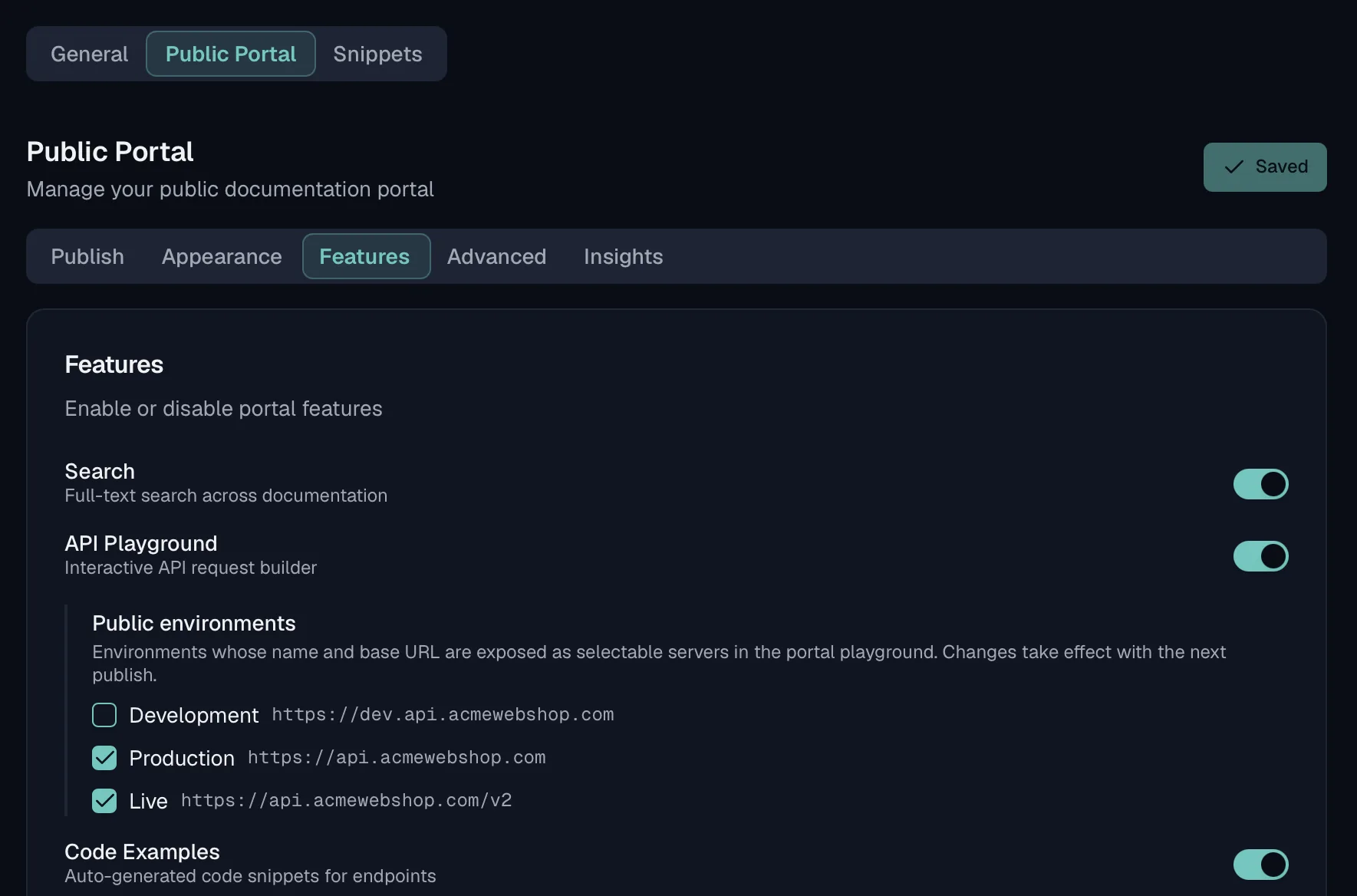
If no environment is opted in, the portal falls back to the project environment that carries the role of feeding the public docs, and then to the servers declared in the specification itself. Code examples are generated per endpoint, and the languages shown on the portal are the ones selected in the documentation settings. The Publishing guide describes the feature toggles and how the base URLs are resolved at publish time.
Frequently asked questions
What is interactive API documentation?
It is documentation where the reader can send a real request from the page instead of copying an example into another tool. The page carries a request builder that is filled from the contract, so the parameters, the body shape and the required headers are already correct. The reader then sees the actual response from the server they picked.
Is an API playground worth it?
It is worth it when the reader can reach a server that will answer them. A playground pointed at production with no credential turns every first attempt into a 401, which teaches the reader that the feature is broken. Give it a safe environment, or a mock, and it shortens the distance between reading and working code.
Which base URL should the documentation show?
The one a reader can actually call, which is usually a sandbox or a public environment rather than the internal host your team uses. If several are legitimate, let the reader pick and say what each one does. A reader who copies a sample against the wrong host debugs an authorization error that has nothing to do with their code.
What should never appear in API documentation?
Any working credential, any internal hostname that consumers are not meant to reach, and any example containing real customer data. Screenshots are the usual leak, because a token that is hard to spot in an image is trivial to read once the page is published and cached.
Last reviewed by The Routebase Team.